
Master SQL Left Joins: Comprehensive Guide with Real-World Examples
Boost Your Database Skills: Learn How to Use Left Joins to Combine and Filter Data in SQL


Introduction
Are you looking to get a better grasp on left joins in SQL? If so, you’re in the right place! In this article, we’ll dive deep into the world of left joins, exploring various examples to help you master this essential SQL skill.
SQL Cookbook
The SQL Cookbook is an exceptional resource for both beginners and experienced users seeking to enhance their SQL skills. The book presents a comprehensive and practical approach to understanding and implementing various SQL techniques, offering clear explanations and real-world examples. Its didactic style enables readers to grasp complex concepts easily, while the wide range of query solutions provided caters to the needs of diverse users.
Why Focus on Left Joins?
Left joins are a powerful and versatile tool in SQL. They enable you to retrieve all rows from the left table while still including relevant data from the right table. Mastering left joins can help you write more efficient queries and broaden your SQL skillset.
Tables
Orders

Customers

Products

Example 1: Basic Left Join
Suppose we have two tables: orders and customers. Assuming you have the following data in the orders and customers tables:
SELECT orders.order_id, customers.customer_name, customers.email
FROM orders
LEFT JOIN customers
ON orders.customer_id = customers.customer_id;
This query returns all rows from the orders table and any matching rows from the customers table. The orders_customers table shows the order_id, customer_name, and email from the orders and customers tables, combined using a left join based on the customer_id.
Example 2: Left Join with Multiple Tables
Now, let’s add another table: products. We can use a left join to retrieve all orders along with their customer and product information.
SELECT
orders.order_id,
customers.customer_name,
customers.email,
products.product_name,
products.price

FROM orders

LEFT JOIN customers
ON orders.customer_id = customers.customer_id

LEFT JOIN products
ON orders.product_id = products.product_id;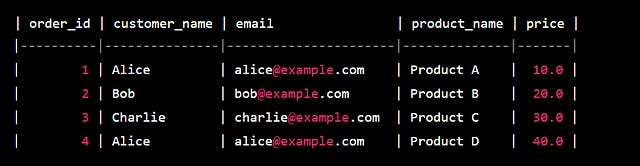
This query combines data from three tables, demonstrating how left joins can be used with multiple tables.
Example 3: Left Join with Conditions
Let’s say we want to find all orders placed within the last 30 days, along with their customer information. We can add a WHERE clause to our left join:
SELECT orders.order_id, customers.customer_name, customers.email
FROM orders
LEFT JOIN customers
ON orders.customer_id = customers.customer_id
WHERE orders.order_date >= DATE_SUB(CURDATE(), INTERVAL 30 DAY);
Based on the SQL query you provided, the result of the left join between the orders and customers tables with the specified WHERE clause would look like this:

The orders_customers_last_30_days table shows the order_id, customer_name, and email from the orders and customers tables, combined using a left join based on the customer_id. The WHERE clause filters the results to only include orders within the last 30 days.
Example 4: Left Join with Aggregations
Suppose we want to find the total amount spent by each customer. We can use a left join along with the SUM function:
SELECT customers.customer_name, SUM(orders.total_amount) AS total_spent
FROM customers
LEFT JOIN orders
ON customers.customer_id = orders.customer_id
GROUP BY customers.customer_name;
This query groups the results by customer_name and calculates the sum of their total_amount spent.

The customer_total_spent table shows the customer_name from the customers table and the calculated total_spent based on the total_amount from the orders table. The tables are combined using a left join based on the customer_id, and the results are grouped by customer_name.
Example 5: Left Join with NULL Values
Let’s find all customers who haven’t placed any orders. We can use a left join and check for NULL values:
SELECT customers.customer_name, customers.email
FROM customers
LEFT JOIN orders
ON customers.customer_id = orders.customer_id
WHERE orders.order_id IS NULL;
The customers_no_orders table shows the customer_name and email from the customers table, combined with the orders table using a left join based on the customer_id. The WHERE clause filters the results to only include customers who haven't placed any orders (where orders.order_id is NULL).
Common Pitfalls and Tips
Remember that left joins return all rows from the left table, regardless of whether there’s a match in the right table.
When using multiple left joins, be mindful of the order in which you join tables.
Be cautious when using left joins with large datasets, as performance can be impacted.
Conclusion
By now, you should have a solid understanding of left joins in SQL and their various use cases. Keep practicing with different examples to further refine your skills. Remember, mastering left joins is an essential step towards becoming an SQL pro.
FAQs
What’s the main difference between a left join and an inner join?
A left join returns all rows from the left table, regardless of whether there’s a match in the right table, whereas an inner join returns only rows with matching values in both tables.
Can I use a left join with more than two tables?
Yes, you can chain multiple left joins together to retrieve data from multiple tables.
How can I improve the performance of left join queries?
Consider using indexes on the joined columns and filtering your results with a WHERE clause to improve performance.
Are left joins always the best choice?
While left joins are versatile, it’s essential to choose the appropriate join type based on your specific requirements.
Can I combine left joins with other join types in a single query?
Yes, you can mix different join types in a single query, such as using a left join with an inner join or a right join.
Thank you for reading it, 🐼❤️.